

For a lot of people, the value of Shift was never complicated. It was simple: connect multiple email accounts, keep them in one place, and switch between them quickly without living inside a normal browser window all day.
That is why the recent Shift Legacy transition has felt surprisingly disruptive for some longtime users. Public support material confirms that Shift v9/Legacy reached end-of-life and users were asked to migrate to Shift Browser. For people who actually wanted a broader browser-centric workspace, that may be a fine direction. But for users who mainly cared about managing several inboxes quickly, the transition can feel like the product moved away from the original job they hired it to do.
This is the key point: not every user wants a bigger, more ambitious platform. Some people simply want a clean desktop app that helps them manage Gmail and Microsoft inboxes in one place. If that sounds familiar, you are not asking for too little. You are asking for the core job to be done well.
Try InboxCabin free for 30 days. No credit card required.
 Start Free Trial
Why the Shift transition feels disruptive for some users
The change is not just about design preference. It is about workflow. Many longtime users built habits around a focused email tool. When software evolves into a browser-first experience, the workflow changes along with it. Suddenly there are more features, more surfaces, more settings, and often more visual complexity than the original user wanted.
That does not mean a browser-style product is wrong. It simply means the product is now optimized for a different type of user. Some people genuinely want email, apps, chat, search, tabs, and productivity tools all bundled together. Others do not. They want their browser to remain their browser, and they want their email manager to remain their email manager.
There is also a practical issue. When a product’s scope expands, the customer has to re-learn where everything lives. Even if the company offers migration tools and customization options, the customer still pays a time cost. For users who only wanted the old core function, that cost feels unnecessary.
The official Shift retirement notice explains that the v9 application was shut down on September 30, 2026 and directs customers toward Shift Browser. It also says customers migrating to Shift Browser may need to authenticate their underlying email and app accounts again. That distinction matters: the migration is a product transition, not a transfer of control over anyone’s Gmail or Microsoft account.
Shift’s official Legacy retirement notice confirms the September 30, 2026 end-of-life date. Its browser offering serves users who want a broader workspace; the purpose of this guide is to help readers decide whether that direction matches their own needs.
What many multi-email users really want from their software
If you strip away the noise, the most common needs are surprisingly modest. Users want to add multiple inboxes, keep them separated, stay signed in, and move between them with minimal friction. They want a dedicated workspace that feels lighter than managing everything in a web browser full of tabs.
They also want clarity. Which inbox am I in? Which profile is active? What mailbox did that attachment download from? If I add a second or third account, will it stay neatly separated from the others? These are the real day-to-day questions.
Most users in this category are not trying to build a digital headquarters. They are trying to avoid logging in and out constantly. They are trying to keep work, side projects, and personal email organized. That is why a simpler product can be powerful. Simplicity is not a lack of ambition when it is aligned with the job the user actually needs done.
30-day free trial. No credit card required.

A simpler alternative: email-first instead of browser-first
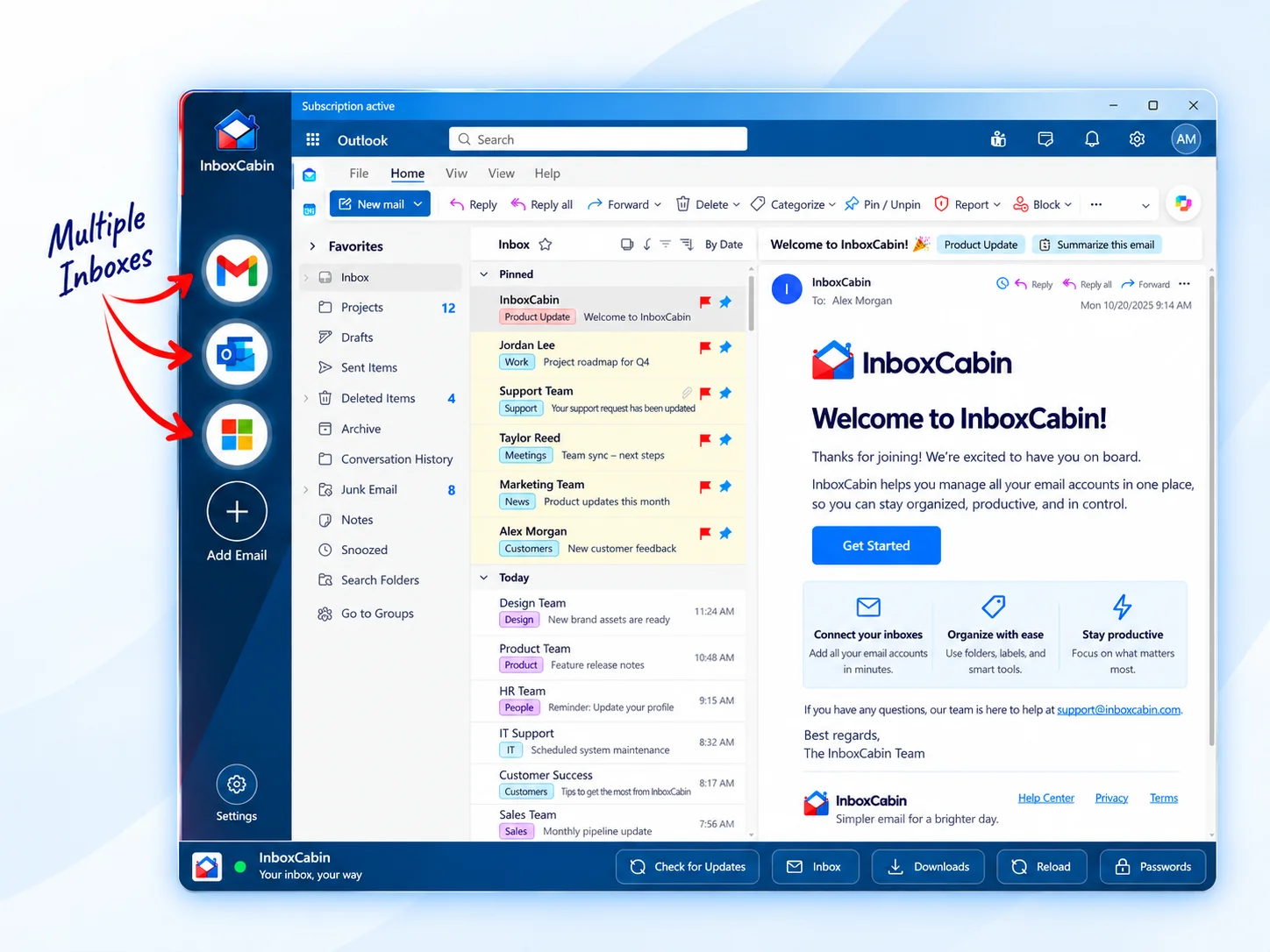
InboxCabin was built around that exact idea. Instead of asking users to adopt a new all-in-one browsing environment, InboxCabin focuses on the core use case: managing multiple Gmail and Microsoft inboxes from one clean desktop app.
That means you can keep your normal browser for the rest of your life online—Slack, project tools, research, docs, and everything else—while using InboxCabin as a dedicated place for your inboxes. For many users, that separation is a benefit, not a limitation.
It also means the learning curve stays small. Add your inboxes. See them clearly in the sidebar. Switch with a click. Keep separate saved sessions. Keep your setup organized. That is the pitch, and for the right customer, that is enough.
If you are evaluating alternatives after the Shift Legacy sunset, it is worth asking yourself one honest question: do you really want a bigger browser-style system, or do you simply want fast multi-inbox management again? Your answer will tell you what to try next.
A practical way to evaluate your next tool is to test one workday, not a feature list. Add the accounts you genuinely use, switch between them during normal work, notice whether the sidebar stays clear, and check whether you still reach for your usual browser for unrelated tasks. The experience should feel simpler by the end of the day, not like another system you need to maintain.
Who InboxCabin is built for
InboxCabin is especially useful for consultants, small business owners, operators, and anyone else juggling multiple email identities. If you run several brands, help clients from separate inboxes, or maintain personal and business email side by side, the value is immediate.
It is also a fit for users who liked the simplicity of older multi-email workflows. If you do not want your email app to become your everything app, that is completely reasonable. A lot of productive people prefer tools with tighter boundaries.
And because InboxCabin is a desktop app, it creates a dedicated environment for email without forcing you to change how you use the rest of your web tools. That is a subtle but meaningful difference.
If the biggest change is losing a familiar routine, read about the qualities people miss in the old Shift workflow. When you are ready to try a different setup, follow our guide to switching from Shift without rebuilding everything.
Final thoughts
Publicly available Shift support resources make it clear the company is committed to its browser direction. That may be perfect for some users. But it also creates an opening for people who want something simpler.
If you are one of those users, the good news is that you do not need to overcomplicate the problem. You probably do not need a new digital ecosystem. You may just need a clean, dependable way to manage multiple inboxes again.
That is the gap InboxCabin is designed to fill. If your main pain point is simply switching between email accounts quickly and staying organized, download InboxCabin and see whether a focused desktop approach feels like home.
Try InboxCabin free for 30 days. No credit card required.
Start Free TrialInboxCabin is an independent Windows app and is not affiliated with Shift. Gmail and Microsoft may require sign-in and multifactor authentication. “Lighter” describes a focused workflow, not a measured memory or speed comparison.