

The modern browser is where everything happens: research, accounting, project boards, forms, chat, customer portals, analytics, and a dozen tabs that you swear you will close after lunch. Email often gets thrown into that same pile, even though communication behaves differently from ordinary web work.
That is why I prefer a dedicated place for email. Not because browser tabs cannot display Gmail or Outlook—they can—but because giving email its own workspace changes the way I move through the day. Less hunting for the right tab, less mixing personal and business identities, and fewer moments where a quick inbox check turns into unrelated browsing.

Try InboxCabin free for 30 days. No credit card required.
 Start Free Trial
The hidden cost of a crowded browser
A crowded browser creates small decisions every time you need to do something. Where is the right account? Is it in this window or the other Chrome profile? Did I open it earlier, or do I need to sign in again? None of those questions is difficult, but repeating them across the day adds avoidable friction.
For a practical example of how browsers organize those identities, Google documents separate Chrome profiles. That option works well for some people, but it still leaves email inside a browsing environment.
Email is especially sensitive to that kind of clutter because it is frequently interrupted. A client sends a question. A payment confirmation arrives. Someone needs a document. If the inbox is buried beneath other work, the act of finding it can be more distracting than the message itself.
This does not mean everyone needs new software. Someone with one inbox and five browser tabs may never notice the problem. The friction becomes more visible when you manage three, five or eight email accounts alongside everything else.
Separation can make your day feel calmer
A dedicated email space helps you distinguish between communication and execution. You open email to read, answer, triage and follow up. You open your browser to research, build, review and use the other services needed to get work done.
Those categories overlap, of course. You may click a link from an email to a customer portal or open a document to answer a question. The point is not to impose an artificial rule. It is to maintain a familiar home for email so you can return to the correct inbox without searching through a dozen unrelated tabs.
Some people even prefer to keep their communication app on a second monitor. Their main display remains dedicated to the task in front of them while email is visible and accessible without taking over the main browser.
Why I don’t need an all-in-one productivity browser
Some people love having Slack, email, calendars, task tools and web apps combined in a single browser-style workspace. If that works for you, great. The important question is whether that arrangement solves a problem you personally experience.
For my workflow, the browser already does a good job of holding general web tools. What I wanted was not a replacement browser, but a small utility that made multiple inboxes easier to manage. That is a narrower problem, and a narrower product is often the better fit.
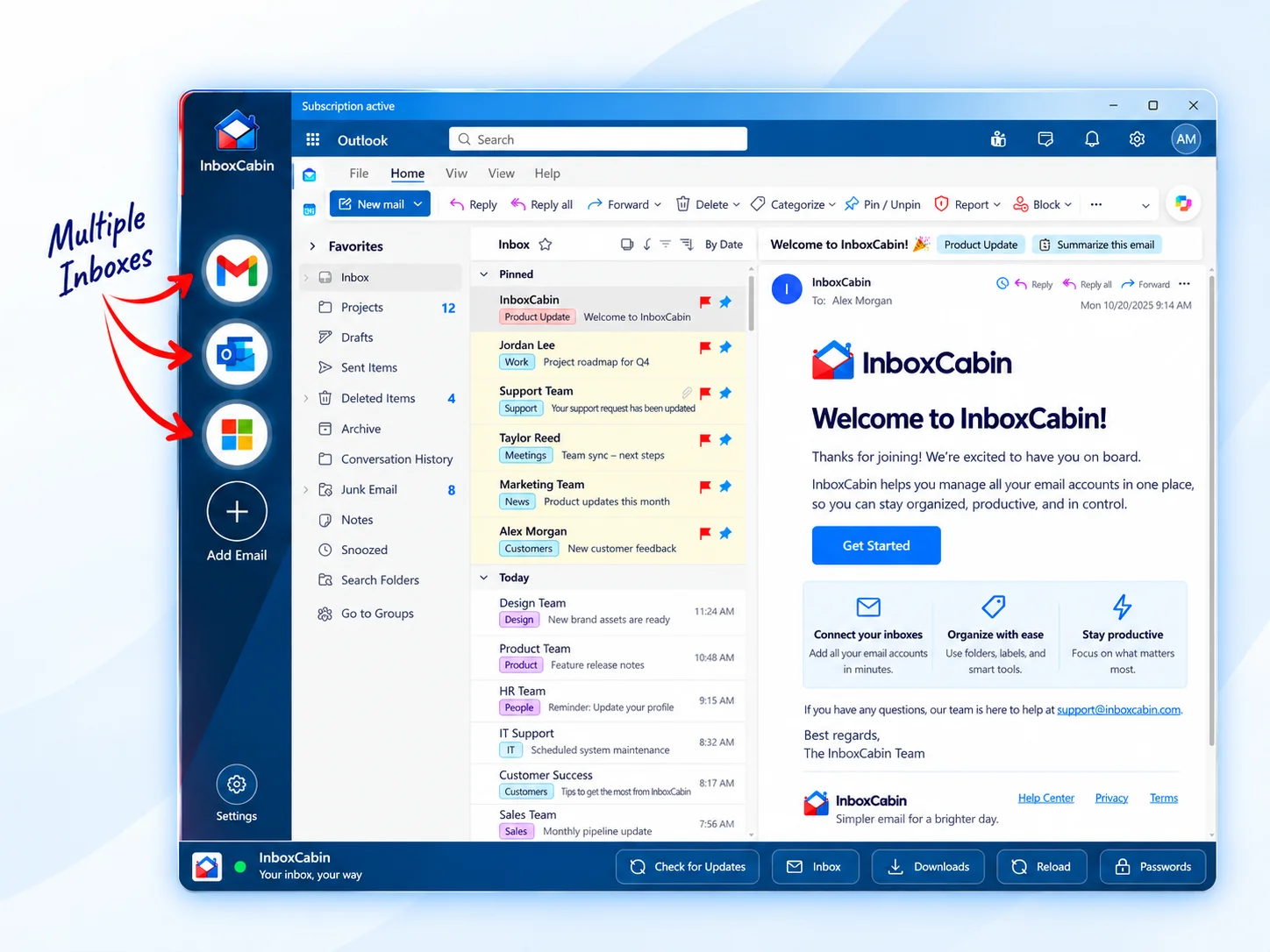
InboxCabin was built with that preference in mind. It gives Gmail and Microsoft inboxes a dedicated Windows desktop environment while leaving the rest of your web workflow alone. Instead of learning another large productivity system, you manage mail accounts from a simple sidebar.
For a practical next step, see how to set up two monitors for email productivity.
30-day free trial. No credit card required.

What a dedicated multi-inbox setup looks like
Picture a Windows desktop with one browser open for research, spreadsheets, client portals and project software. Separately, a desktop email app contains your personal Gmail, business Outlook and two additional inboxes. When a message arrives, you switch to the right account directly. When you finish replying, you go back to the main task.
The familiar webmail interfaces are still present. Gmail still looks like Gmail. Outlook still looks like Outlook. You are not adopting an unfamiliar combined message client just to move between accounts. That familiarity matters when you have built years of habits around those services.
It is also easier to avoid unnecessary tool sprawl. The dedicated app does not need to replace Slack or your CRM. You can keep those where they already work for you.
Three habits that make the separation more effective
First, label email accounts clearly. A company name or recognizable role makes a better sidebar label than a long address you have to read every time. Choose distinct icons when available so you can recognize the account almost instantly.
Second, establish an order for checking mail. Start with the account most likely to contain time-sensitive work, then move through the others. This prevents every inbox from competing equally for your attention. If a lower-priority account only needs a few checks per day, treat it that way.
Third, close unnecessary browser mail tabs once you have decided on a dedicated workspace. Otherwise, you may end up duplicating the very clutter you were trying to reduce. A cleaner routine only helps if you use it consistently.
Is there a downside?
Yes. A dedicated app adds another piece of software to install and update. It may not be worth that extra step if you only use one or two mailboxes occasionally. There can also be sign-in prompts when Google or Microsoft applies security checks; no legitimate desktop wrapper can promise those will never happen.
The right question is whether the time and attention saved are worth the extra application. For someone switching among several accounts all day, the answer may be yes. For someone using one inbox twice daily, probably not.
Email deserves its own space—if you want it
Keeping email separate from your browser is not a universal productivity law. It is a workflow choice. The goal is less friction, not more rules. If your current arrangement works, keep it.
But if your browser has become a crowded combination of research, SaaS tools, and six different mailboxes, a dedicated email workspace may be exactly the simplification you need. Download InboxCabin and see whether managing your inboxes separately helps the rest of your day stay focused.
Try InboxCabin free for 30 days. No credit card required.
Start Free TrialWant more background? Read why some users are returning to simpler email management.