

A common mistake in software is assuming that the most powerful user is the user with the most features. In reality, some of the most effective people deliberately choose narrower tools.
That matters in the conversation around Shift and similar platforms. There is a real audience for big integrated workspaces. But there is also an audience that sees all of that and thinks, ‘I don’t need another universe. I need a clean way to handle my inboxes.’
That second audience is important. These are not anti-tech users. In many cases they are highly productive people who understand tools very well and simply prefer clear boundaries.
Try InboxCabin free for 30 days. No credit card required.
 Start Free Trial
The difference between power users and focused users
A power user is often imagined as someone who wants everything centralized. Many do. They want app switching inside the product, multiple communication surfaces, browsing layers, and more automation.
A focused user is different. They are not looking for fewer capabilities because they are less sophisticated. They are looking for fewer capabilities because they know exactly what job they need done. They want email handled well, and they would rather let their browser, chat tools, and project apps live separately.
This is why it is entirely possible for a user to be technically capable and still prefer a simpler email manager. Simplicity is not a compromise when it matches the workflow.
Consider a small business owner who operates a consulting business, handles a community organization inbox, and keeps personal email separate. They might use a CRM for sales, a browser for banking and research, and a chat app for their team. A focused email manager does not need to pull all those tools inside itself to improve the owner’s day. It needs to make the switching and separation of those inboxes effortless.
Shift has written extensively about its broader workspace approach on its official blog. The question is not whether those features are useful; it is whether they belong in your preferred email workflow.
What simplicity gives back to the user
The first thing simplicity gives back is attention. A focused interface asks less of the brain. There are fewer places to look, fewer features to interpret, and fewer decisions between the user and the next action.
The second thing it gives back is predictability. Users know where their accounts are, how to switch, and what the app is for. That lowers resistance to using it throughout the day.
Third, it gives back separation. Many people do not want email fused with everything else. They want a dedicated communication zone. That separation can improve focus, especially for people juggling business, client, and personal accounts.
30-day free trial. No credit card required.

Questions to ask before choosing your next tool
If you are evaluating alternatives after feeling dissatisfied with Shift, ask yourself a few straightforward questions.
Do I want my email tool to replace my browser, or just complement it? Do I want one workspace for all apps, or a dedicated workspace for email only? Do I care more about breadth or about clarity? And when I say I want productivity, do I mean more features or less friction?
Those questions help surface the right solution. A lot of users instinctively shop by feature count. But feature count is not the same thing as fit. The better question is whether the tool respects how you already prefer to work.
This difference is also useful when training someone else. A virtual assistant or employee needs to know which mailbox to open and what account they are replying from. A clearly labeled, dedicated email sidebar can be easier to explain than an everything-in-one workspace with many unrelated applications. That matters even when the user is highly technical.
How InboxCabin serves the focused user
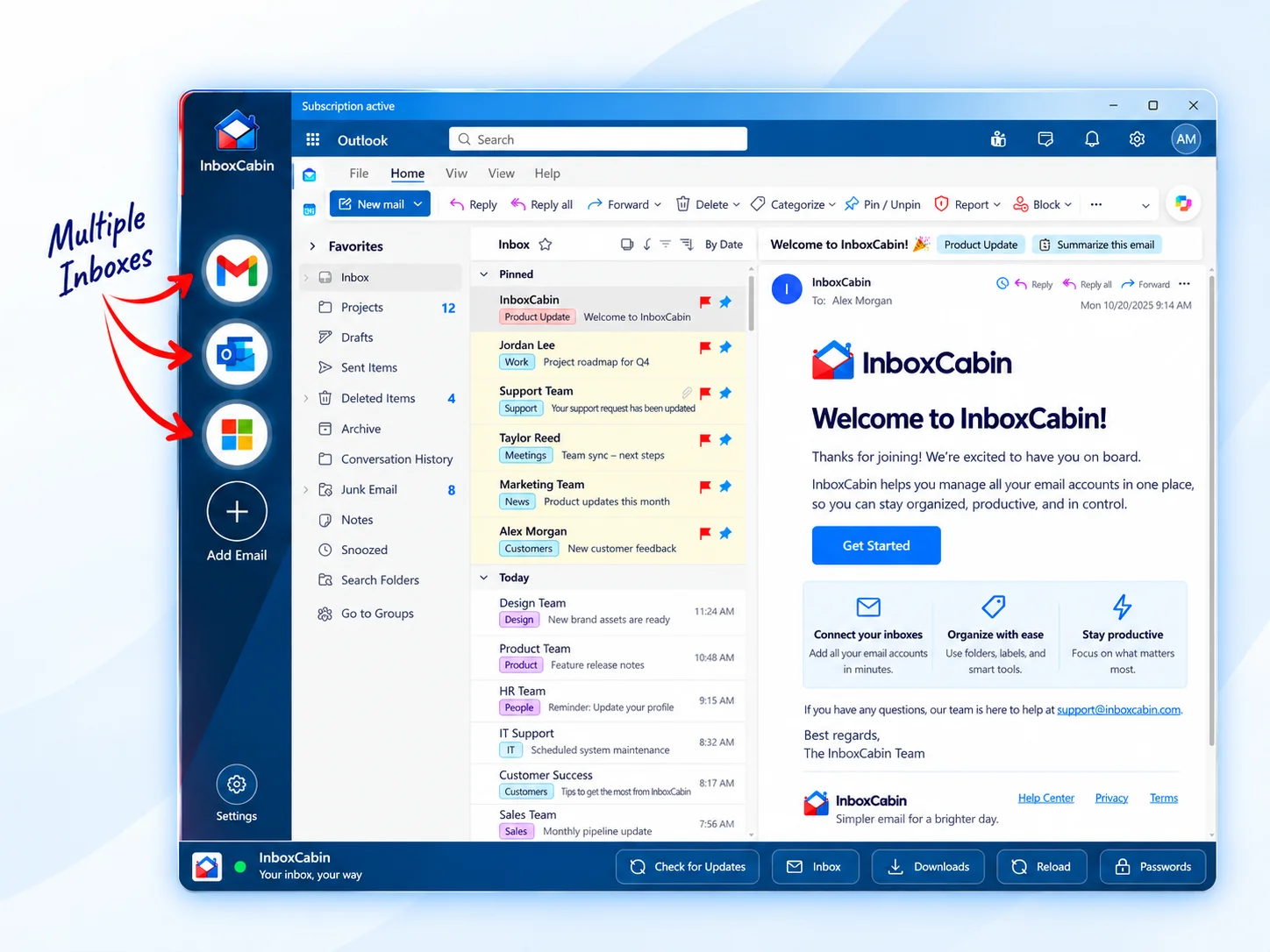
InboxCabin is built for the focused user. The goal is straightforward: make it easy to manage multiple Gmail and Microsoft inboxes inside one clean desktop app.
That means fast account switching, a familiar sidebar model, and a dedicated environment that does not try to swallow the rest of your work life. You can keep using your preferred browser for research, chat, SaaS tools, and everything else, while letting InboxCabin do the email-specific job.
For users who feel that current all-in-one tools are simply too much, that approach can be a relief. It replaces sprawl with clarity.
Some users also discover that simpler email management improves consistency across the team. When the tool is easy to understand, it is easier to train assistants, employees, or contractors who need access to different inboxes. Clear boundaries make onboarding faster and reduce the chance that important messages get buried inside a larger, more distracting environment.
If feature overload is the main source of friction, explore an inbox-first approach when Shift Browser feels too heavy. Our introduction to InboxCabin then shows what that focused approach looks like in everyday use.
Final thoughts
The market often acts as if software has to become more expansive to stay relevant. But there will always be room for tools that solve a narrow problem cleanly.
If you are a Shift user who has realized you prefer a more focused experience, that is not a step backward. It may be a sign that you know exactly what kind of tool helps you work best.
InboxCabin was made for that kind of user. If your priority is simple, dedicated multi-inbox management, download it and see whether the focused path feels better.
Try InboxCabin free for 30 days. No credit card required.
Start Free TrialInboxCabin is an independent Windows app and is not affiliated with Shift. Gmail and Microsoft may require sign-in and multifactor authentication. “Lighter” describes a focused workflow, not a measured memory or speed comparison.